
Founded in 2016 by Zhang Yiming, TikTok remains the focal destination for short-form mobile videos. It has been enthralling us with its hilarious, newsy and enlightening content. From Zack King to Will Smith, TikTok has had quite a colossal influence worldwide.
However, TikTok whose mission is to imbue creativity and spread happiness is banned in many countries like India, UK, France, EU, Belgium and Afghanistan having concern over privacy. In spite of the altercations, TikTok is consumed by millions of people. While some spend their time watching the content, some create the content. No matter if you are the former or the latter, you deserve to be in peace with zero bullying and no invasion of your personal lives. If you want to know how to block someone on the platform, here are a few solutions.
How to block someone on TikTok profile? (using a desktop)
- Go to the TikTok website.
- Log in to your account.
- In the search box, enter the username of the person to be blocked.
- Visit the profile of the person.
- Hover your mouse over the three dots on the right-hand corner.
- Click on the ‘Block’ option.
- Confirm the block by clicking the block on the pop-up.
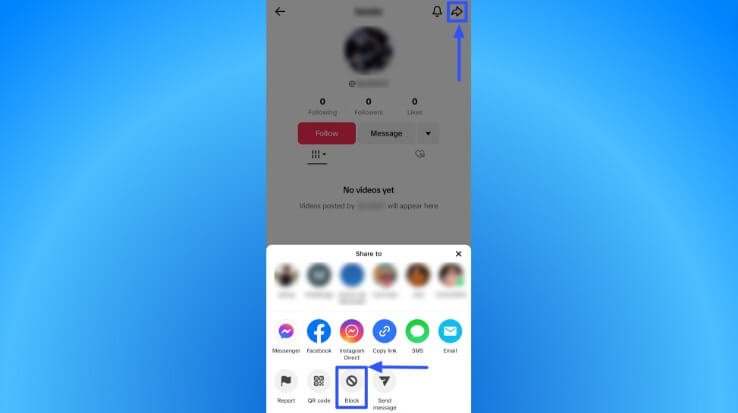
How to block someone on TikTok profile? (using a mobile)
- Open the TikTok app.
- Sign in using your credentials.
- Tap the search on the top-right corner.
- Enter the username of the user to be blocked.
- Click the username from the results to go to the intended profile.
- Select the ‘Share’ icon on the top-right corner.
- Tap the ‘Block’.
- Confirm the block by clicking the block on the pop-up.
Blocking multiple users:
If you want to block more than one user on TikTok without going to each of their profiles, you can follow these steps.
- If there’s a comment you found offensive, tap and hold it.
- You can also tap the ‘Pencil’ icon in the upper-left corner.
- Select ‘Manage multiple comments'(you can choose up to 100 comments)
- Tap ‘More’ and click ‘Block accounts’
- Confirm the block.
Calm Down!
We know it is not easy for everyone to keep cool when someone misbehaves with you. That doesn’t mean you should keep quiet. Escalate the issue straight away. But be mindful to respond responsibly. Document or screenshot the comments, so that will help as a proof. Most importantly, set boundaries and encourage healthy discussions.