Do you need to create a fillable PDF form, but you don’t want to spend money on expensive PDF software such as Adobe Acrobat? Or maybe you are looking for something more user-friendly to finish your tasks faster? You have come to the right place if you said yes to any of these. Here is how to make a fillable PDF form without Acrobat.
In comparison to Acrobat, UPDF is a great option to use for editing PDFs as it’s cost-effective and has a great user interface. The application is easy to use and can be accessed on any device, including Android and iOS. Take a look at this complete guide to go through various options for creating forms with UPDF. This includes adding fields, form field recognition and creating fillable PDFs from Word and Excel. Before following along, remember to download the software. Now, without further ado, let’s dive in!
How to Make a Fillable PDF Without Acrobat by Adding Field
If you want to create a fillable PDF form from scratch, you must use the “adding field” option. Follow the below steps.
Open your UPDF software and click “File” > “Create” > “Blank Page” in the top panel. This will open a blank PDF page.
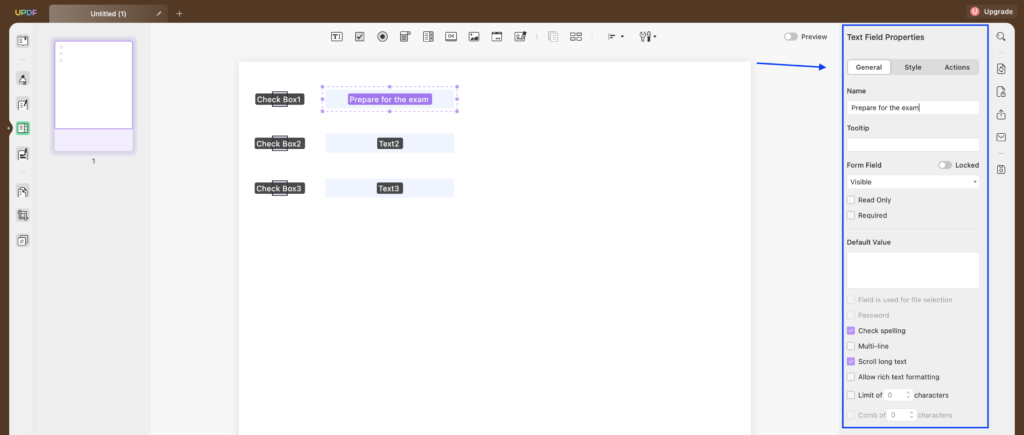
Navigate to the menu on the left and choose the “Prepare Form” option to enter the form-making mode.
From the menu at the top, you can choose various options that will allow you to create a desired fillable PDF form. You can add text fields, checkboxes, radio buttons, dropdowns, list boxes, images as well as dates and digital signatures. Just pick one of the options, and then click any space in your document to create a field.
You can also customize any field by double-clicking it and editing it on the right-side panel. The “General” tab allows to input text, whereas the “Style” tab allows users to change text colors, fonts and sizes.
If you want to paste your fields onto the other pages, select all fields and click “Duplicate Across Pages”.
To export your form, click “File” and “Save as” from the top menu. Choose a destination on your device to save it and click “Save”.
Without Acrobat with Form Field Recognition
If you already have a PDF with tables and you need to convert it into a fillable PDF, you can use form field recognition.
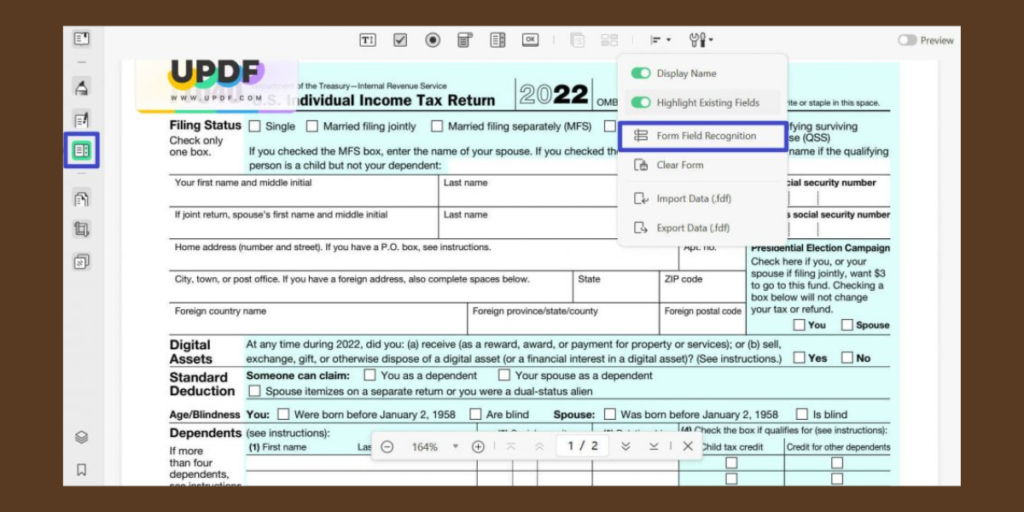
Upload your PDF file to UPDF and choose “Prepare Form” from the left-side menu.
Click the last icon from the top panel and choose “Form Field Recognition” from the drop-down list. This will make your PDF file fillable.
To export your form, click “File” and “Save as” from the top menu. Choose a destination on your device to save it and click “Save”.
How to Make a Fillable PDF Form from Word Without Acrobat
You can also convert your Word documents into fillable PDFs with UPDF. This is really straightforward, follow the steps below.
Open your UPDF software and navigate to the top menu. Select “File” > “Create” > “PDF from Word”. Now choose the file you want to edit. The selected document will be imported into UPDF.
Once your file is uploaded, choose the “Prepare Form” option from the panel on the left.
Now use the tools icon and select “Form Field Recognition” to make the PDF fillable.
To export it as PDF, choose “File” and “Save as” from the top panel. Choose a destination on your computer and click “Save”.
Making Fillable PDF Form from Excel Without Acrobat
If you have an Excel document with tables and wish to create a fillable PDF, this can be easily achieved with UPDF. Follow the steps below to transform your Excel data into an interactive PDF.
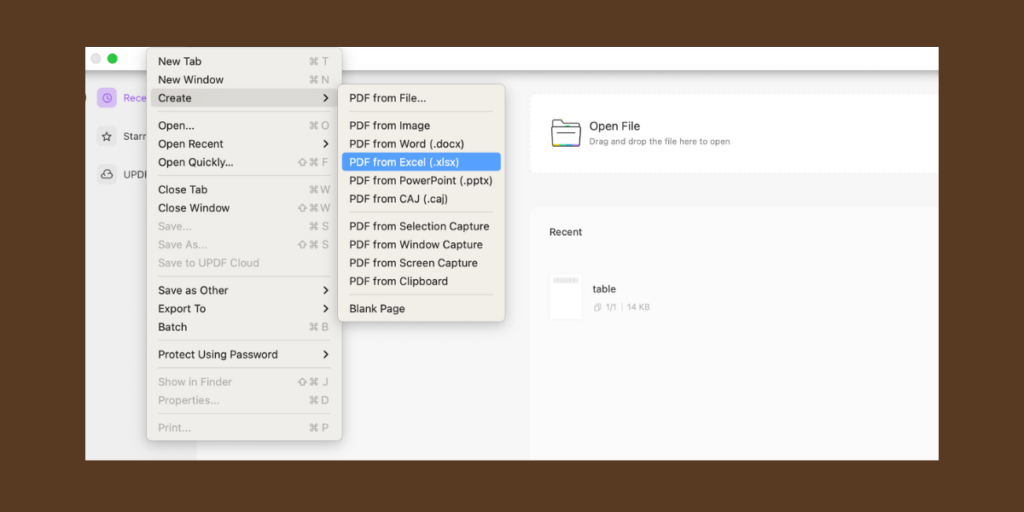
Launch UPDF software on your device and navigate to the top panel. Select “File” > “Create” > “PDF from Excel” and choose the file you want to edit. Now your Excel file will open in UPDF.
Once your document is uploaded, choose the “Prepare Form” option from the menu on the left.
Now use the tools icon and select “Form Field Recognition” to make the PDF fillable.
To export it as a PDF document, choose “File” > “Save as” from the top panel. Choose a destination on your device and click “Save”.
There are a lot of different tools that can help you create fillable PDFs. However, some of them may not provide enough features, be too complicated to use, or like Acrobat, be too expensive. We hope that after reading this guide you know how to make a fillable PDF form without Acrobat. UPDF is a great cost-effective solution that will help you edit PDFs with ease. You will not only be able to create fillable PDF forms from scratch but also convert existing documents with tables into fillable PDFs. Don’t wait, download UPDF and enjoy designing beautiful forms.
Joshua James is a technology writer and reviewer at Gadgets Middle East. He regularly tests and reviews a wide range of consumer electronics, offering clear and practical insights based on everyday use and hands-on evaluation.
From low-battery anxiety and accidental drops to unreadable screens and blurry photos, the HONOR X9e Pro is designed around the everyday frustrations people would rather not think about. There are enough things to think about during the day without adding a smartphone to the list. Did I charge it last night? Can I see the […]
The new soundcore AeroClip 2 earbuds combine Apple-certified iPhone compatibility, a comfort-focused design informed by 2000 ear scans and AI translation in over 100 languages.



 GDGTME Team